Product
Product Features
GENESIS64™ product configuration
GENESIS64™ licenses are available as a server license, client license, and optional license. Please select products by referring to the flow of selection.
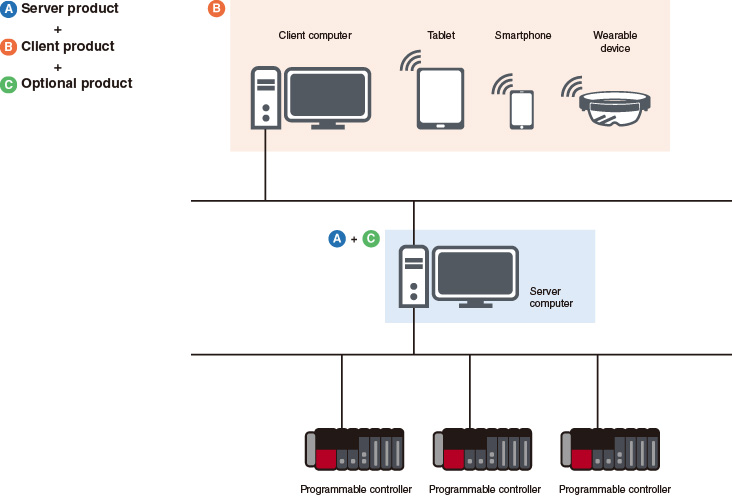
● : included – : not included
Function list (A server product)
| GENESIS64™ Basic SCADA | GENESIS64™ Advanced | ||
|---|---|---|---|
| How to count tags | Static Tag (count all tags) | Dynamic Tag (count tags in use) | |
| Number of tags | 75, 150, 500, 1500, 5K*1 | 75, 150, 500, 1500, 5k, 15k, 50k, 100k, 250k*1 | |
| Server function | |||
| AlarmWorX™ Server & Logger | Alarm visualization | ● | ● |
| WebHMI™ Server | Remote monitoring (for web browser) | ● | ● |
| AssetWorX™ Server | Asset management using a hierarchical tree structure | ● (Excel® based bulk asset configuration tool is not included) | ● |
| Hyper Historian™ Express*2 | High-speed/highly reliable data collection | ● | ● |
| Redundant/Distribute | Redundant/distributed server | – | ● |
| AlertWorX™ | Alarm notification by email | Option | ● |
| MobileHMI™ Server | Remote monitoring (for mobile application) | Option | ● |
| Workflow | Programming by flowchart | Option | ● |
| Hyper Historian™ Standard/Enterprise*2 | High-speed/highly reliable data collection (extended version) | Option | Option |
| BridgeWorX™ | Transaction-based processing by flowchart | Option | Option |
| ReportWorX™ | Automated reporting | Option | Option |
| Connection to devices/external services | |||
| Mitsubishi Electric FA Connector | Mitsubishi Electric products connection (direct driver) | ● | ● |
| OPC Classic | OPC Classic connection | ● | ● |
| OPC UA | OPC UA connection | ● | ● |
| Databases (GridWorX™ Server) | Database access | ● | ● |
| MODBUS® | MODBUS® connection | Option | ● |
| BACnet® | BACnet® connection | Option | ● |
| SNMP | SNMP connection | Option | ● |
| Web Services | Web service access | Option | ● |
| IoT Publisher (MQTT/AMQP/JSON) | Data transferring to cloud service | Option | ● |
| Client function | |||
| GraphWorX™ | Graphic creation/visualization | ● (without 3D function) | ● |
| TrendWorX™ Viewer | Real-time and historical trends | ● | ● |
| AlarmWorX™ Viewer | Alarm visualization | ● | ● |
| EarthWorX™ Viewer | Monitor widely dispersed assets | – | ● |
| KPIWorX™ | Dashboard creation | ● | ● |
| ReportWorX™ Express | Manual reporting | ● | ● |
| Workbench | Centralized project management | ● | ● |
| Asset Navigator | Asset tree display | Option | ● |
| GridWorX™ Viewer | Database access | Option | ● |
| System configuration support function | |||
| Converter-GOT | GOT (HMI) screen conversion | ● | ● |
| Asset Builder | Process screen creation support | Option | Option |
*1. Select additional tag option to increase tag count if needed.
*2. For functional differences, please refer to the function list (Hyper Historian™ products).
*2. For functional differences, please refer to the function list (Hyper Historian™ products).