Human-Machine Interfaces (HMIs)-GOT GOT2000 Series

GOT and inverter system configurations
Select the required connection type to match your system configuration. Multiple inverters can be monitored with one GOT by switching the target station number.
CASE 1
Direct connection with Ethernet
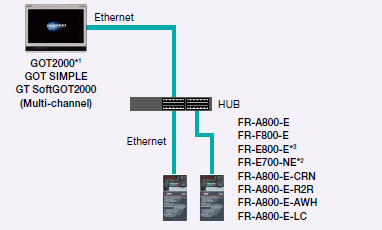
- *1 The models with an Ethernet port are supported among GT21 models.
- *2 The models with SERIAL “□88******” or later on the rating plate are supported.
- *3 Line topology is also supported by FR-E800-E.
CASE 2
CC-Link IE Field Network connection via programmable controller
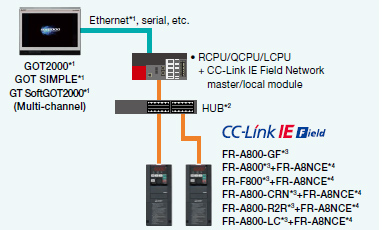
- *1 GT21, GS21, and GT SoftGOT2000 support Ethernet connection only.
- *2 In the CC-Link IE Field Network configuration, select a switching hub by referring to the relevant manual for the programmable controller used.
- *3 The models with SERIAL “□83******” or later on the rating plate are supported.
- *4 The FR-A8NCE with SERIAL “□83***” or later is supported.
CASE 3
CC-Link IE TSN connection via programmable controller
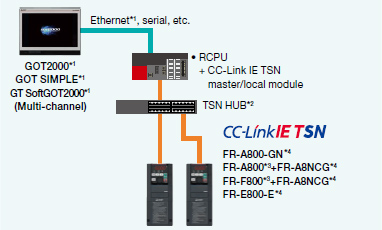
- *1 GT21, GS21, and GT SoftGOT2000 support Ethernet connection only.
- *2 In the CC-Link IE TSN configuration, select a switching hub by referring to the relevant manual for the programmable controller used.
- *3 The models with SERIAL “□96******” or later (made in Japan) or “□97******” or later (made in China) on the rating plate are supported.
- *4 Set the third octet of the inverter's IP address to the network No., and set the fourth octet to the station number.
CASE 4
Ethernet connection via programmable controller
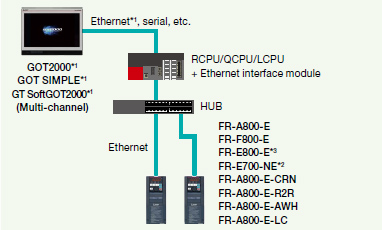
- *1 GT21, GS21, and GT SoftGOT2000 support Ethernet connection only.
- *2 The models with SERIAL “□88******” or later (for FR-E700-SC-NNE and FR-E700-SC-ENE, “□89******” or later) on the rating plate are supported.
- *3 Line topology is also supported by FR-E800-E.
CASE 5
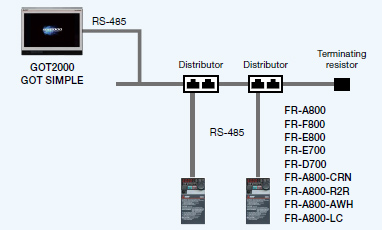
Direct connection with RS-485
Related Link