
โมดูลการเคลื่อนที่ คุณสมบัติ (PLCopen® Motion Control FB Mode)

- คุณสมบัติ
- ข้อมูลจำเพาะ
- มาตรฐาน
- ยุติการผลิต
- ไลน์อัป
- Inter-Module Synchronization
- Acceleration/Deceleration Methods
- Synchronous Control
- Touch Probe ฟังก์ชัน
- Servo System Recorder
- CC-Link IE TSN Safety Communication ฟังก์ชัน
- สภาพแวดล้อมวิศวกรรม
- GX LogViewer
- Easy Pre-Verification and Troubleshooting
- Security Key Authentication ฟังก์ชัน
- Quick Start Guide
- รายการฟังก์ชัน
- ลิงก์ที่เกี่ยวข้อง


- ●The โมดูลการเคลื่อนที่s are programmed in ST language. PLC CPUs are in ladder, FBD/LD, and ST language.
- ●The library of PLCopen® Motion Control FBs, which are compliant with international standards, are available for programming.
- ●Users can analyze the operation status with logging data on GX LogViewer, which improves debug efficiency.
[An example of programming by PLC CPU
(Programming by PLC CPU only) ]
![[An example of programming by PLC CPU (Programming by PLC CPU only) ]](/primal/assets/img/products/cnt/ssc/pmerit/ssciqr/rd78g/feat_fb-01.png)
A PLC CPU program starts operation of the โมดูลการเคลื่อนที่, eliminating the need for users to create another program for the โมดูลการเคลื่อนที่, reducing programming burden.
[An example of programming by each โมดูล
(Programming by PLC CPU and โมดูลการเคลื่อนที่s) ]
![[An example of programming by each module (Programming by PLC CPU and โมดูลการเคลื่อนที่s) ]](/primal/assets/img/products/cnt/ssc/pmerit/ssciqr/rd78g/feat_fb-02.png)
โมดูลการเคลื่อนที่s can execute operations in place of the PLC CPU. This reduces the operation.
ไลน์อัป

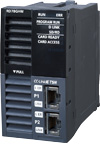


RD78GHV
RD78GHW
- Maximum number of การควบคุม axes:
RD78GHV: 128 axes/โมดูล
RD78GHW: 256 axes/โมดูล - Minimum operation cycle *1:
31.25 [μs] - ST language program capacity:
ในตัว ROM max. 64 MB + SD memory card
*1.The operation cycle varies by the number of การควบคุม axes and the models.
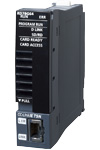
RD78G4/RD78G8
RD78G16/RD78G32
RD78G64
- Maximum number of การควบคุม axes:
RD78G64: 64 axes/โมดูล - Minimum operation cycle *1: 62.5 [μs]
- ST language program capacity:
ในตัว ROM max. 16 MB
+ SD memory card
*1.The operation cycle varies by the number of การควบคุม axes and the models.
Improved Performance
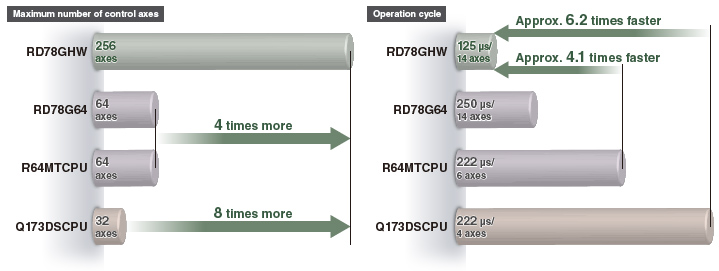
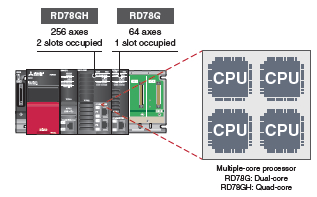
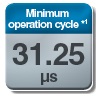
The minimum operation cycle of RD78GH in PLCopen® motion การควบคุม FB mode is approximately 4.1 to 6.2 times faster than that of the previous models, and the number of maximum การควบคุม axes is 4 to 8 times more. The data from the servo amplifiers and input/output signals can be received at high ความเร็วs, which reduces the cycle time.


*1.The values are applicable when RD78GH is used.
Inter-Module Synchronization
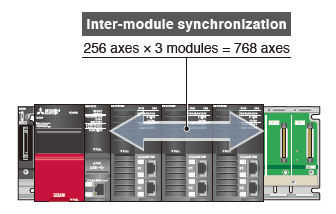
The inter-โมดูล synchronization ฟังก์ชัน can synchronize the การควบคุม timings among multiple โมดูลการเคลื่อนที่s on the same base unit.
- Machines can be synchronized through this ฟังก์ชัน wheneach machine uses โมดูลการเคลื่อนที่s.
Acceleration/Deceleration Methods
Three ชนิดs of acceleration/deceleration methods are available: trapezoidal acceleration/deceleration, jerk acceleration/deceleration, and acceleration/deceleration time fixed.
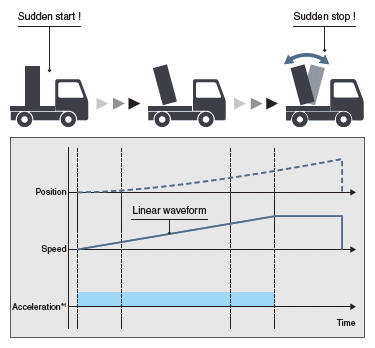
Trapezoidal acceleration/deceleration
After starting, maximum acceleration is maintained until the target ความเร็ว is reached.
For example, when a vehicle loaded with a workpiece accelerates suddenly, the workpiece will swing back and forth due to the impact of the sudden acceleration.
To reduce impacts and vibrations in a case such as this, the vehicle must accelerate at a slower rate.
The ความเร็ว creates a trapezoidal shape.
Jerk acceleration/deceleration
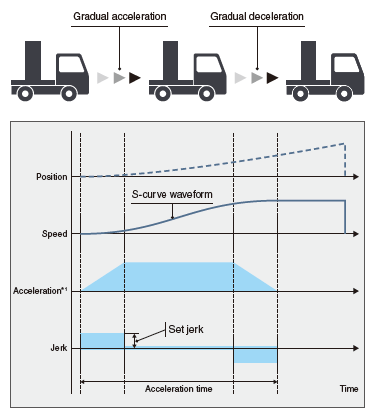
The acceleration changes gradually.
For example, when a vehicle loaded with a workpiece accelerates gradually, the load will not swing back and forth after acceleration.
The jerk is maintained during acceleration.
When the vehicle has almost reached the target ความเร็ว, the jerk is decelerated. Adjusting jerk in this way achieves smooth acceleration/deceleration while also shortening the time it takes to reach the target ความเร็ว.
The ความเร็ว creates a S-curve shape.
Acceleration/deceleration time fixed method
This method executes acceleration/deceleration based on the time specified, regardless of the commanded ความเร็ว.
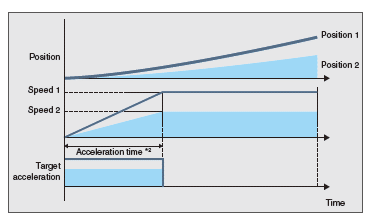
- *1.อินพุต acceleration.
- *2.Specify acceleration time.
Synchronous Control
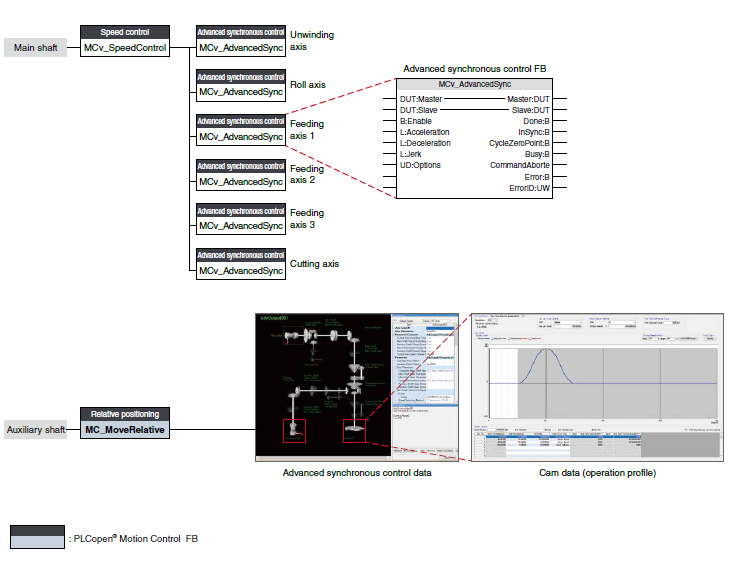
การควบคุมแบบซิงโครนัส is performed using ฟังก์ชัน blocks that operate as software-based mechanical โมดูล such as gears, shafts, ความเร็ว change gears, and cams.
- Positioning and การควบคุมแบบซิงโครนัส can be performed together in the same program.
- การควบคุมแบบซิงโครนัส using a synchronous encoder as an input axis is also possible.
- The output axis is operated based on cam data (operation profile).
Flexibly Combining Synchronous Control FBs
The number and the combination of the synchronous โมดูล are flexibly selected, achieving optimized operation.
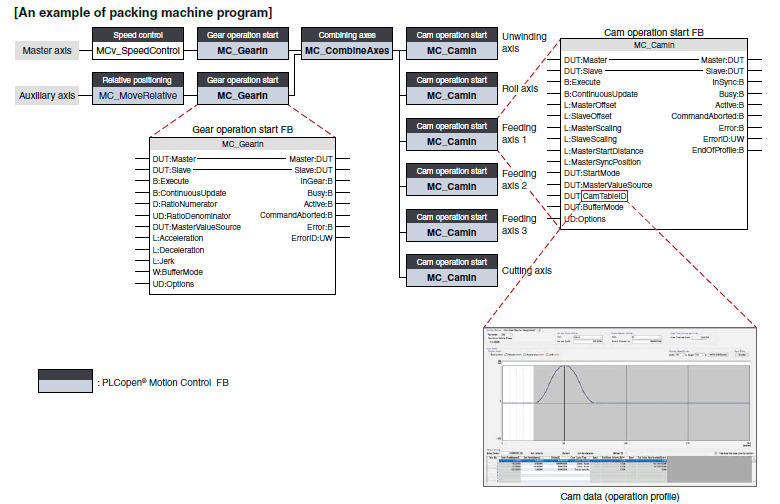
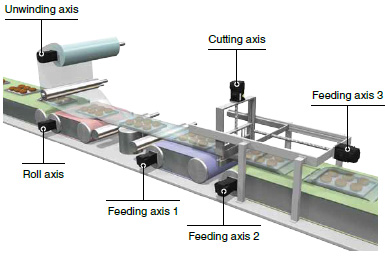
Packing machines
This application synchronizes all the axes,
from the cutting axis through the unwinding axis, with the master axis.
Cutting operation is performed with the cutting axis and the feeding axis 3.
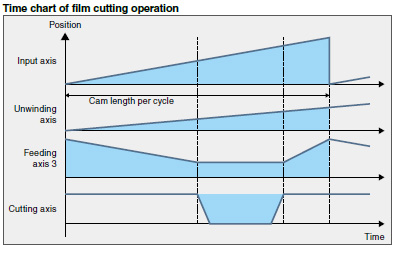
การควบคุมแบบซิงโครนัสขั้นสูง FB Settings with Graphic-Based Interface
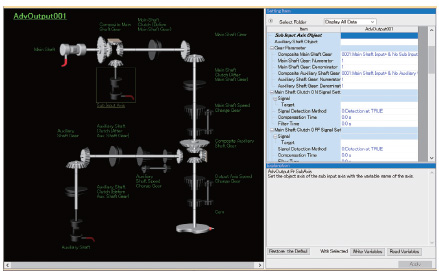
การควบคุมแบบซิงโครนัส can be easily executed by setting synchronous โมดูล with parameters and starting the advanced การควบคุมแบบซิงโครนัส FB. Synchronous โมดูล such as the auxiliary shafts, gears, clutches, and ความเร็ว change gears can be set with a graphic-based interface.
Advanced การควบคุมแบบซิงโครนัส data
Images of enabled synchronous โมดูล are highlighted, allowing easy verification of set data through visualization.
- อินพุต axis data
- Synchronous parameter (output axis)
- Auxiliary shaft data
- Clutch data
- Gear data
- ความเร็ว change gear data
- Cam data (operation profile)
- Cam waveform ชนิด
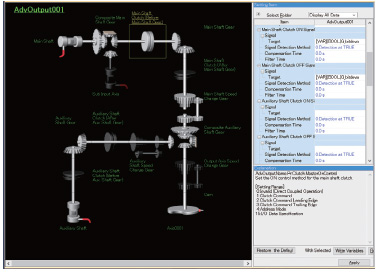
Clutch
The clutch is used to transmit/disengage command pulses from the main/auxiliary shaft input side through turning the clutch ON/OFF, which การควบคุมs the operation/stop of the output axis.
The clutch can be set to the main shaft clutch and the auxiliary shaft clutch.
| Clutch ON การควบคุม mode | Clutch OFF การควบคุม mode |
|---|---|
| Invalid (Direct coupled operation) |
Invalid (OFF การควบคุม invalid) |
| Clutch command | Clutch command (One-shot operation) |
| Clutch command leading edge | Clutch command leading edge |
| Clutch command trailing edge | Clutch command trailing edge |
| ที่อยู่ mode | ที่อยู่ mode |
| I/O data specification | I/O data specification |
A clutch can be used through the advanced การควบคุมแบบซิงโครนัส FB.3
Advanced การควบคุมแบบซิงโครนัส data
Restarting การควบคุมแบบซิงโครนัส
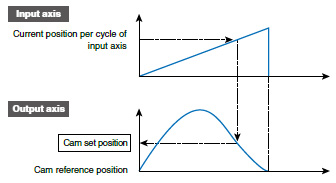
In case that the synchronous positions become misaligned due to an emergency stop, etc, การควบคุมแบบซิงโครนัส can be restarted by using the การควบคุมแบบซิงโครนัส analysis mode.
In the การควบคุมแบบซิงโครนัส analysis mode, the cam set position is updated on the basis of the input axis. The synchronous position can be aligned using the updated cam set position before starting การควบคุมแบบซิงโครนัส.
Synchronous Encoder
The โมดูลการเคลื่อนที่ easily performs การควบคุมแบบซิงโครนัส by setting a synchronous encoder to "Real encoder axis" and creating a program with ฟังก์ชัน blocks.
The number of command pulses can be adjusted using the ฟังก์ชัน block (MC_Gearin) or a parameter.
An incremental synchronous encoder *1can be connected via a servo amplifier.
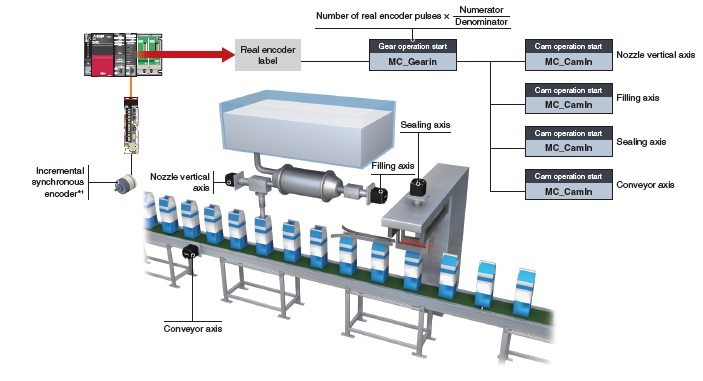
- *1.การสนับสนุนed by MELSERVO-J5 Series.
When connecting an absolute position synchronous encoder, use an encoder of HK Series servo motors.
Cam Data (Operation Profile Data)
Create operation profile data *1 (cam data) according to your application. The created cam data is used to การควบคุม output axis.
*1."Operation profile data" is a general name for waveform data, which is used for various applications.
■ Cam Operation
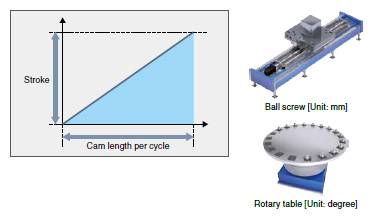
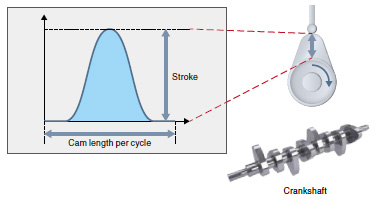
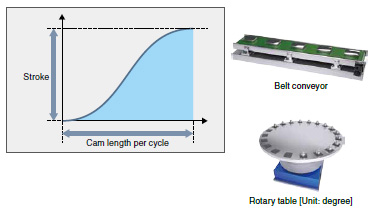
The following three cam operations are available: linear operation, การทำงานสองทิศทาง, and feed operation. Choose one according to your application.
Linear operation
The cam pattern is a linear line.
This pattern is used for a ball screw and a rotary table.
Two-way operation
The beginning and the end of the cam pattern are the same.
Mechanical cams fall into this category.
Feed operation
The beginning and the end of the cam pattern differ.
This pattern is used for fixed-amount feed operations and intermittent operations.
Set the end point for the feed operation to a position of your choice.
Touch Probe ฟังก์ชัน
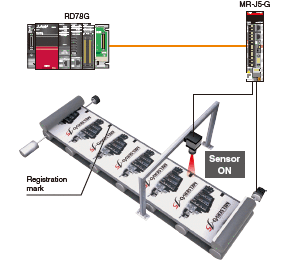
This ฟังก์ชัน latches data responding to a trigger signal input to a servo amplifier.
The compensation amount is calculated based on the latched data, and the error is compensated using a compensation axis.
A high-accuracy touch probe at 1 μs is possible.
Servo System Recorder
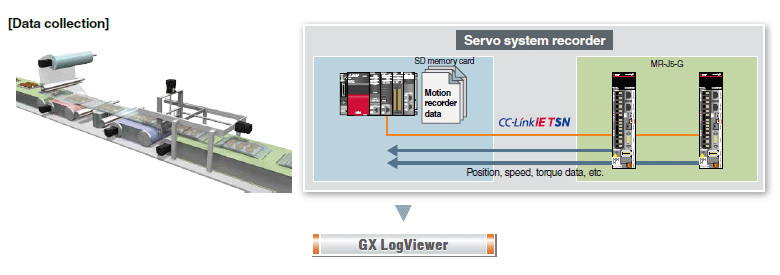
The โมดูลการเคลื่อนที่ automatically collects data of all servo amplifiers when an error occurs. The collected data, such as the command and the feedback values, greatly helps you analyze the error cause.
- Automatic collection of data, such as position, ความเร็ว, and torque data, without programming.
- Data collection of all axes, which helps you locate the error cause even when the error is caused by the other axes without an error.
- The co-recording ฟังก์ชัน collects data even when an error occurs in other recording อุปกรณ์s.
GX LogViewer
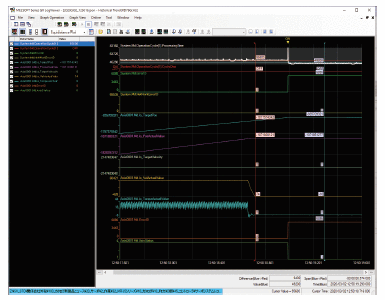
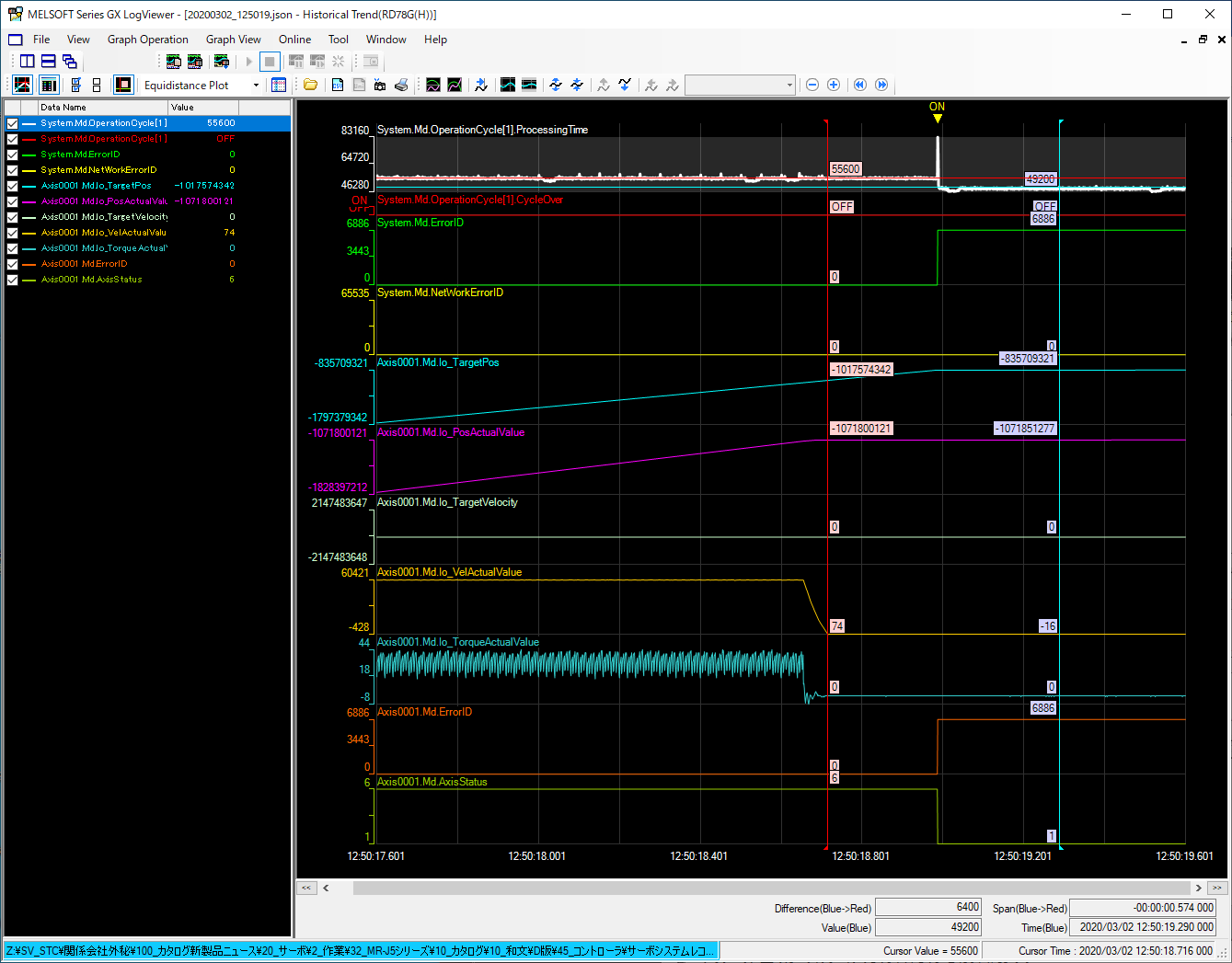
The collected data can be checked on GX LogViewer.
The operation status before and after an error is displayed in waveform, which allows you to analyze more operation details and helps you locate the error cause.
[คุณสมบัติ]
- Displays the collected data and events graphically.
- Enables users to adjust a graph easily by automatic adjustment ฟังก์ชัน and drag operation.

CC-Link IE TSN Safety Communication ฟังก์ชัน
CC-Link IE TSN enables การควบคุม of safety and non-safety communications realizing a flexible system whereby safety communications can be easily incorporated into the main การควบคุม network.
In the following system which integrates safety and non-safety communications, the safety CPU checks the safety signals received via the safety remote I/O โมดูล and outputs the safety signals (STO, etc.) to the servo amplifiers. Outputting safety signals via the network eliminates the need for wiring of safety signals to a safety การควบคุมler and a servo amplifier.
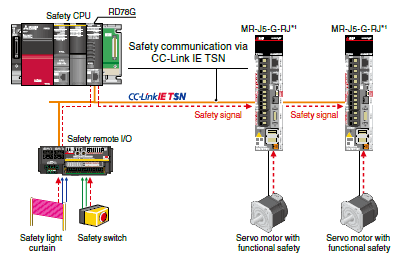
*1.การสนับสนุนed by MELSERVO-J5 Series.
For servo amplifiers that support the safety ฟังก์ชันการสื่อสาร, refer to "Safety Sub-Functions".
สภาพแวดล้อมวิศวกรรม
MELSOFT GX Works3 covers various aspects of development processes - parameter settings, servo adjustments, and debugging of โมดูลการเคลื่อนที่s as well as sequence program creation. This software offers an engineering environment that provides comfortable design environment.
MELSOFT GX Works3
Various features are integrated into GX Works3, which allows users not only to easily create projects but also maintain consistency through the entire development processes.

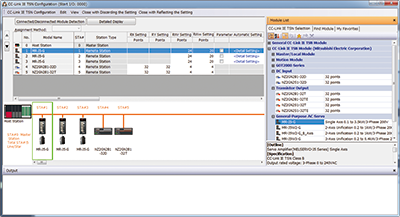
■ เครือข่าย Configuration Settings
[เครือข่าย configuration settings]
- Intuitive network settings with drag-and-drop operations and a graphical screen view
[Automatic detection]
- By clicking the [Connected/Disconnected Module Detection] button, the connection status of อุปกรณ์ stations is automatically detected and the CC-Link IE TSN configuration screen is generated.
■ Easy Programming Through Structured Text Language
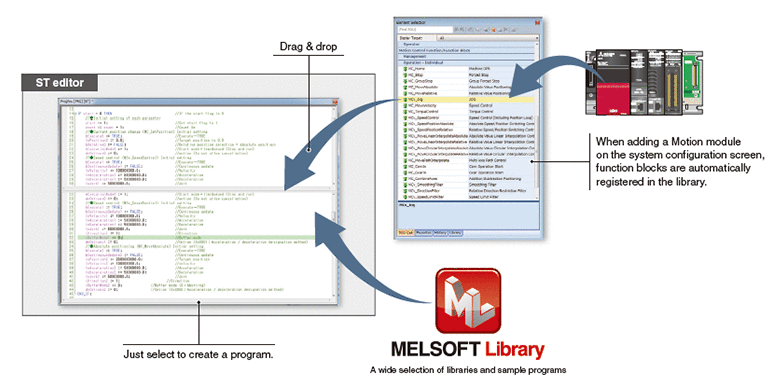
- Structured text programs are composed of ฟังก์ชัน blocks, increasing program readability.
- Modularization of the programs increases their reusability.
- The consistent, คอมมอน operability on a single engineering tool improves usability further.
- A wide selection of programming elements in the MELSOFT Library contributes to reducing programming time.
- The program is created by dragging & dropping programming elements, which simplifies the programming process.
- A startup time is reduced using the simulator of MELSOFT GX Works3 that can debug a program without an actual machine.
■ Programming Using Labels
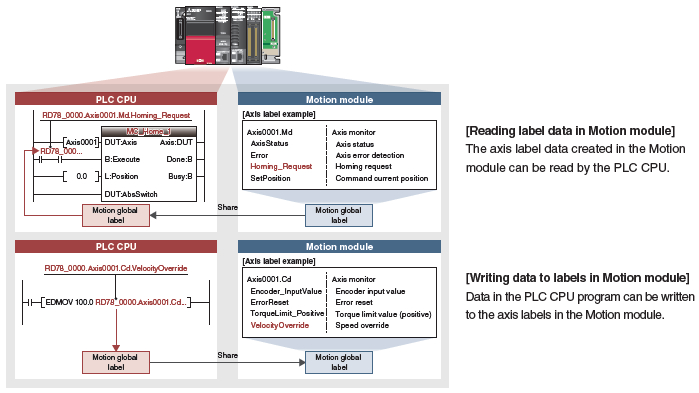
- The การควบคุม axes of the โมดูลการเคลื่อนที่s and I/O signals are defined as label variables, which enables easy reuse of programs and helps to improve programming efficiency.
- The global labels created in the โมดูลการเคลื่อนที่ project can be used in PLC CPUs.
GX LogViewer
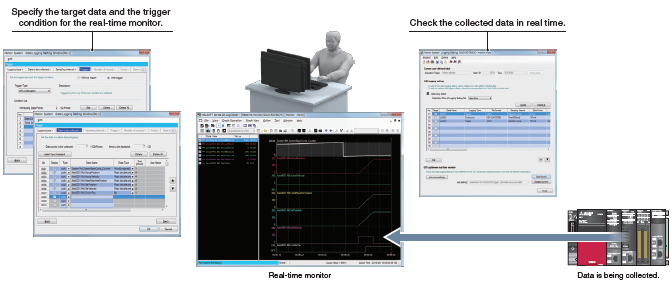
The graph data of both PLC CPU โมดูล and โมดูลการเคลื่อนที่s can be checked on GX LogViewer. This tool helps you efficiently analyze data from two different โมดูล. The following two ฟังก์ชัน are provided for logging: data logging ฟังก์ชัน (offline) and real-time monitor.
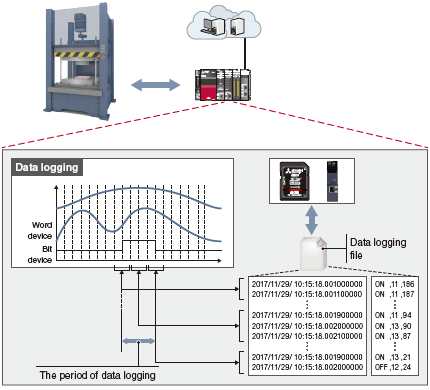
■ Data Logging ฟังก์ชัน
The ฟังก์ชัน performs data logging by a specified time interval based on the logging setting (trigger condition, data collection) written to the motion โมดูล from the engineering tool. The results are saved as a data logging file.
สูงสุด 10 data settings can be simultaneously logged for the motion โมดูล.
The operation status before and after an error is displayed in waveform, which allows you to analyze more operation details and helps you locate the error cause.
■ Real-time monitor
สูงสุด 32 collected motion โมดูล data can be displayed in real time.
Easy Pre-Verification and Troubleshooting
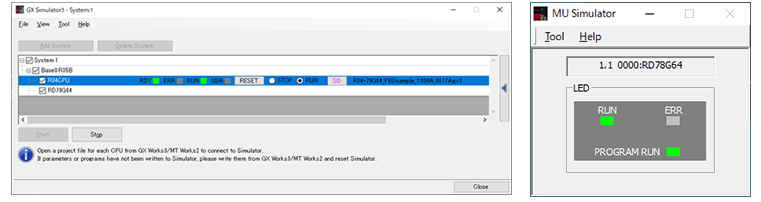
The system simulator enables the โมดูลการเคลื่อนที่ and PLC CPU programs to be simulated interactively.
A program operation can be checked without an actual machine during debugging process, which shortens the startup time.
Security Key Authentication ฟังก์ชัน
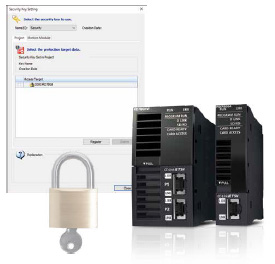
The security key authentication prevents programs from being opened on personal computers where the security key has not been registered. Furthermore, because programs can be executed only by โมดูลการเคลื่อนที่s with the security key registered, the integrity of customer technologies and other intellectual property is not compromised.
Quick Start Guide
รายการฟังก์ชัน
| Motion Module | |||||||
|---|---|---|---|---|---|---|---|
| RD78GHW | RD78GHV | RD78G64 | RD78G32 | RD78G16 | RD78G8 | RD78G4 | |
| Maximum number of การควบคุม axes | 256 | 128 | 64 | 32 | 16 | 8 | 4 |
| Minimum operation cycle [μs] *1 | 31.25 | 62.5 | |||||
| Servo amplifier connection method | CC-Link IE TSN (Communications ความเร็ว: 1 Gbps/100 Mbps) | ||||||
| Servo amplifier ที่เชื่อมต่อได้ | MR-J5-G, MR-J5W-G, MR-J5D-G4 More details MR-JET-G More details |
||||||
| Maximum distance between stations [m(ft.)] |
100(328.08) | ||||||
| โหมดควบคุม | การควบคุมตำแหน่ง, ความเร็ว การควบคุม, Torque การควบคุม, การควบคุมแบบซิงโครนัส, Cam การควบคุม | ||||||
| การควบคุมตำแหน่ง | การควบคุมตำแหน่ง, การอินเตอร์โพเลชันเชิงเส้น (สูงสุด 4 axes), การอินเตอร์โพเลชันแบบวงกลม (2 axes) | ||||||
| Acceleration/deceleration process | Trapezoidal acceleration/deceleration, Jerk acceleration/deceleration, Acceleration/deceleration time fixed method |
||||||
| Programming language | PLC CPU: Sequence program, FBD/LD, ST โมดูลการเคลื่อนที่: ST |
||||||
| หน้าแรก position return | Driver home position return*2 | ||||||
| คู่มือควบคุม | JOG operation | ||||||
| Auxiliary ฟังก์ชัน |
Forced stop, Hardware stroke limit, ซอฟต์แวร์ stroke limit, ระบบตำแหน่งสัมบูรณ์, |
||||||
| คอมมอน ฟังก์ชัน | Touch probe, Axis emulate, Event history, Monitoring of servo data, Servo system recorder, Inter-โมดูล synchronization |
||||||
| Engineering environment | MELSOFT GX Works3 | ||||||
| Number of I/O occupying จุด | 32 จุด + 16 จุด (empty slot) | 32 | |||||
| 5VDC internal กระแส consumption [A] |
2.33 | 1.93 | |||||
| Mass [kg] | 0.44 | 0.26 | |||||
- *1.The minimum operation cycle varies depending on the number of การควบคุม axes and the model.
- *2.The home position return method set in a driver (a servo amplifier) is used.
- *3.การสนับสนุนed by MELSERVO-J5 Series.