
โมดูลการเคลื่อนที่ คุณสมบัติ (Simple Motion Mode)

- คุณสมบัติ
- ข้อมูลจำเพาะ
- มาตรฐาน
- ยุติการผลิต
- ไลน์อัป
- Positioning Control
- การควบคุมแบบซิงโครนัสขั้นสูง
- Continuous Operation to Torque Control
- Auxiliary ฟังก์ชัน
- CC-Link IE TSN Safety Communication ฟังก์ชัน
- Optional Data Monitor
- Driver Communication
- สภาพแวดล้อมวิศวกรรม
- รายการฟังก์ชัน
- ลิงก์ที่เกี่ยวข้อง


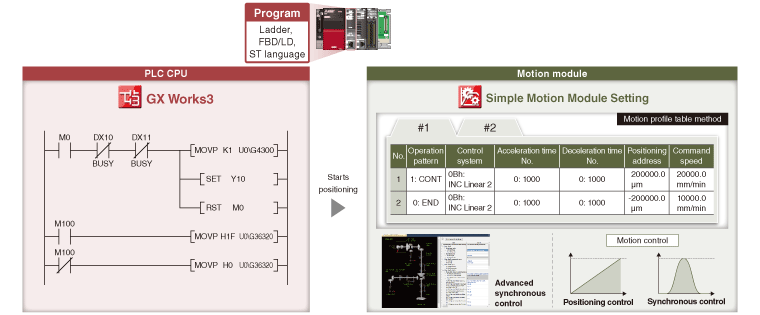
- ●การควบคุมตำแหน่ง can be easily performed with motion profile tables. การควบคุมแบบซิงโครนัส can be executed only with parameter settings.
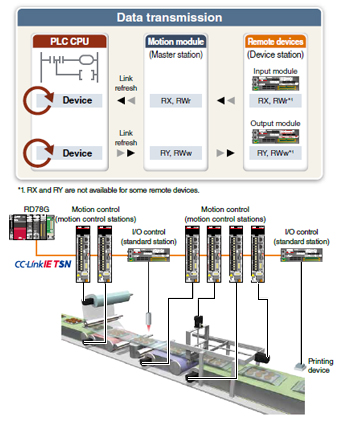
- ●Remote อุปกรณ์s are connected via CC-Link IE TSN and programmed from PLC CPUs.
- ●Data that is synchronized with the motion operation cycle can be collected with the digital oscilloscope. The collected data is displayed in waveforms for operation verification.
[An example of programming by a PLC CPU]
Utilization of Existing Programs
The existing MELSEC iQ-R/MELSEC-Q Series อุปกรณ์s and programs are reusable in a new system of RD78G โมดูลการเคลื่อนที่ that supports the Simple Motion mode.
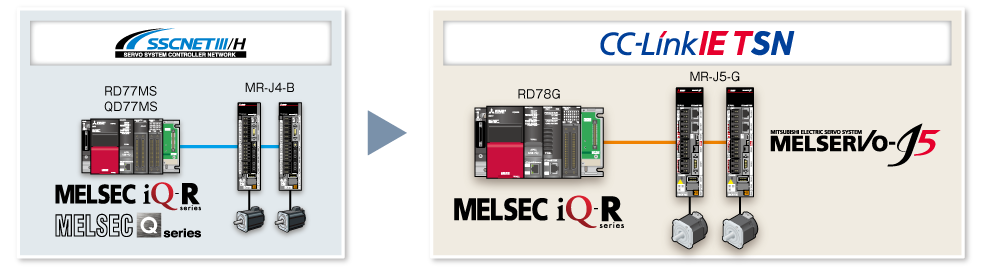
ไลน์อัป


RD78G4
RD78G8
RD78G16
- Maximum number of การควบคุม axes: 16 axes/โมดูล (RD78G16)
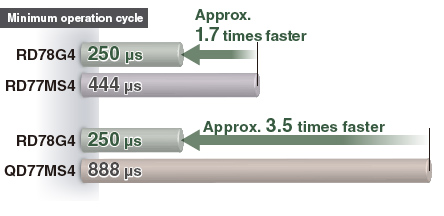
- Minimum operation cycle *1: 250 [μs]
- *1.The operation cycle varies by the number of การควบคุม axes and the models.
Improved Performance
The minimum operation cycle of RD78G in Simple Motion mode is approximately 1.7 to 3.5 times faster than that of the previous models. The data from the servo amplifiers and input/output signals can be received at high ความเร็วs, which reduces the cycle time.
Reuse of Existing Projects
The existing projects of a โมดูล Simple Motion can be reused. This enables reduction in program development time.
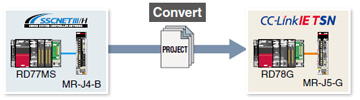
RD77MS→RD78G
Select [Change Module] in the navigation menu of GX Works3 to convert the โมดูล Simple Motion project to a โมดูลการเคลื่อนที่ project.
After the conversion, set the network parameters, servo amplifier parameters, and other parameters.
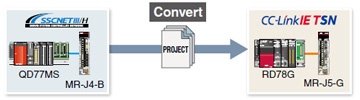
QD77MS→RD78G
Select [Import Simple Motion Module Data] in the navigation menu of GX Works3 to import the parameters of QD77MS.
After the import, set the network parameters, servo amplifier parameters, and other parameters.
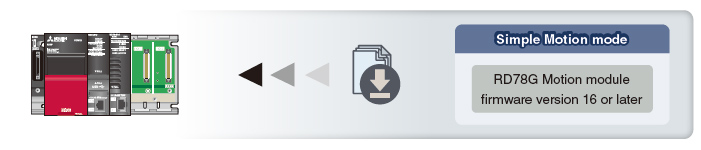
Firmware of RD78G Motion Module
The Simple Motion mode is supported by RD78G with firmware version 16 or later.
To obtain the firmware update files, contact your local sales office.
Positioning Control
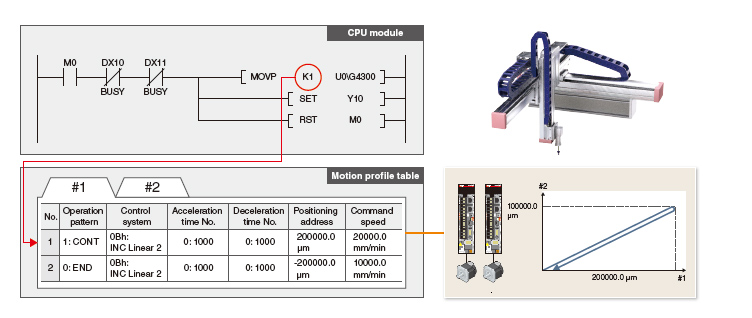
การควบคุมตำแหน่ง is easily executed using a motion profile table.
- To meet various application needs, the โมดูลการเคลื่อนที่ offers various ชนิดs of positioning การควบคุม, such as linear interpolation, 2-การอินเตอร์โพเลชันวงกลมหลายแกน, fixedpitch feed, and continuous path การควบคุม.
- การควบคุมตำแหน่ง can be executed easily by setting the positioning address, the ความเร็ว, and other setting items in a sequence program.
- Powerful sub-ฟังก์ชัน, such as M-code output, skip, ความเร็ว change, and ฟังก์ชันเปลี่ยนตำแหน่งเป้าหมายs, are available.
Programming
The โมดูลการเคลื่อนที่ easily executes positioning operation with the instruction in a sequence program that starts a positioning data of the motion profile table.
การควบคุมแบบซิงโครนัสขั้นสูง
การควบคุมแบบซิงโครนัส can be achieved using software instead of การควบคุมling mechanically with gear, shaft, clutch, ความเร็ว change gear or cam, etc.
- การควบคุมแบบซิงโครนัส can be flexibly started/ended for each axis, enabling the การควบคุมแบบซิงโครนัส axis and positioning การควบคุม axis to be used within the same program.
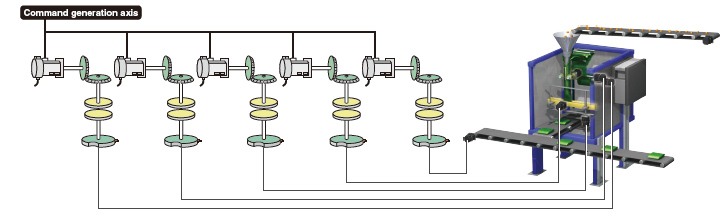
- แกนสร้างคำสั่ง, servo input axis, or synchronous encoder axis *1 can be set as the input axis.
- The output axis is operated with a cam. The following three operations can be performed with the cam ฟังก์ชัน: linear operation, การทำงานสองทิศทาง, and feed operation.
- An incremental synchronous encoder *2 can be connected via servo amplifier.
- *1.การสนับสนุนed by MELSERVO-J5 Series.
- *2.When connecting an absolute position synchronous encoder, use an encoder of HK Series servo motors.
[แกนสร้างคำสั่ง]
แกนสร้างคำสั่ง is the axis that performs only the command generation.
It is การควบคุมled independently of other axes connected to servo amplifiers. (not จำนวนed as a การควบคุม axis)
Parameter Settings
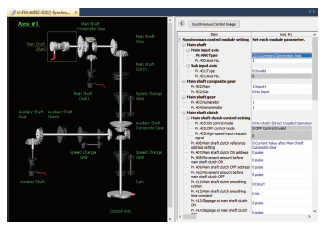
การควบคุมแบบซิงโครนัส is executed by setting parameters of the input axis, output axis, gear, and clutch for การควบคุมแบบซิงโครนัส and turning on the การควบคุมแบบซิงโครนัส start signal.
Cam Data (Operation Profile Data)
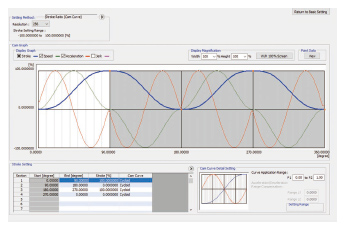
The cam graph can be flexibly and easily created through drag & drop. The waveform is changed according to the pointer's movement.
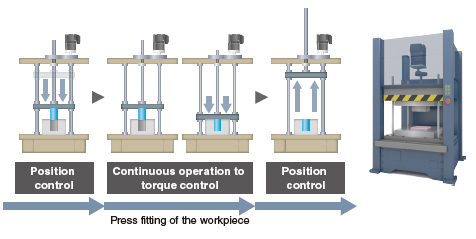
Continuous Operation to Torque Control
The axes are การควบคุมled to run at the constant torque by following the torque command while the กระแส position is being trucked.
Switching from position การควบคุม to การควบคุมแรงบิด continuously can be performed without stopping the servo motor.
Auxiliary ฟังก์ชัน
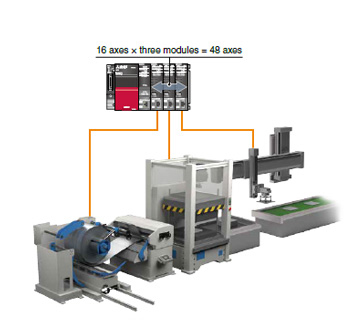
Inter-Module Synchronization
The inter-โมดูล synchronization ฟังก์ชัน can synchronize the การควบคุม timings among multiple โมดูลการเคลื่อนที่s on the same base unit.
Machines can be synchronized through this ฟังก์ชัน when each machine uses โมดูลการเคลื่อนที่s.
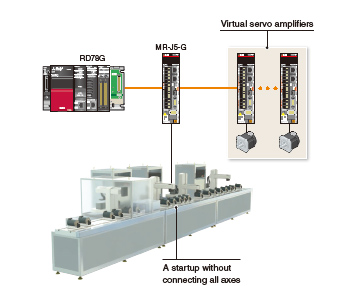
Virtual Servo Amplifier
The virtual servo amplifier ฟังก์ชัน enables operations of a virtual servo amplifier as if an actual unit is connected. When the virtual servo amplifier is set as a servo input axis of การควบคุมแบบซิงโครนัส, the โมดูลการเคลื่อนที่ executes การควบคุมแบบซิงโครนัส with virtually generated input commands. In addition, this ฟังก์ชัน is used to simulate an axis without an actual connection.
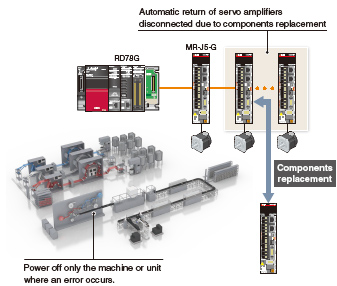
Automatic Return
When อุปกรณ์ stations are back to normal status after disconnected due to a data link error, this ฟังก์ชัน automatically returns the disconnected stations to the network and restarts data link.
Parts can be replaced by turning off only the machine where an error occurred. Powering off the whole system is not required.
Read/Write Operation of มาตรฐาน Stations
- The PLC CPU sends/receives link อุปกรณ์s to/from standard stations (อุปกรณ์ stations other than the motion การควบคุม stations) through a โมดูลการเคลื่อนที่.
- One-to-one communication is possible between the master and อุปกรณ์ stations.
- The PLC CPU can be programmed using the signals of the อุปกรณ์ stations.
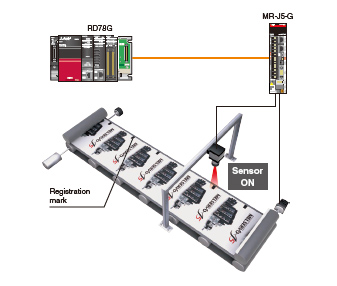
Mark Detection
This ฟังก์ชัน latches data responding to a trigger signal input to a servo amplifier.
The compensation amount is calculated based on the latched data, and the error is compensated using a compensation axis.
A high-accuracy mark detection at 1 μs is possible.
CC-Link IE TSN Safety Communication ฟังก์ชัน
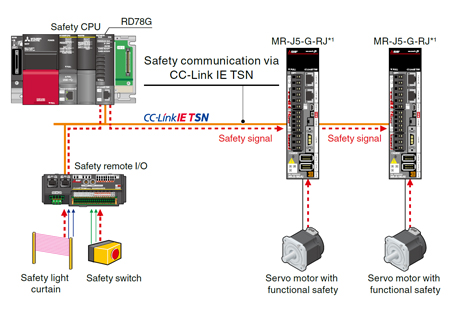
CC-Link IE TSN enables การควบคุม of safety and non-safety communications realizing a flexible system whereby safety communications can be easily incorporated into the main การควบคุม network.
In the following system which integrates safety and non-safety communications, the safety CPU checks the safety signals received via the safety remote I/O โมดูล and outputs the safety signals (STO, etc.) to the servo amplifiers. Outputting safety signals via the network eliminates the need for wiring of safety signals to a safety การควบคุมler and a servo amplifier.
-
*1.การสนับสนุนed by MELSERVO-J5 Series.
For servo amplifiers that support the safety ฟังก์ชันการสื่อสาร, refer to "Safety Sub-Functions".
Optional Data Monitor
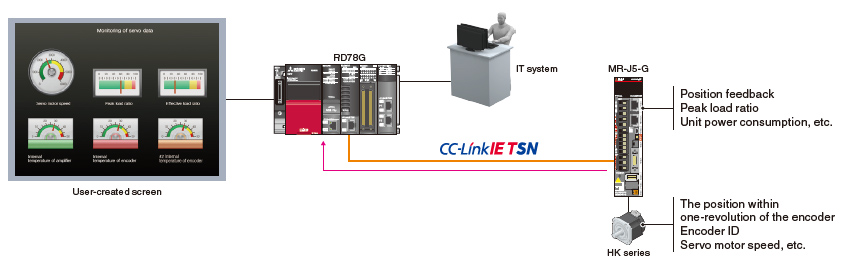
Servo operation is monitored with extensive servo data acquired via CC-Link IE TSN. The acquired data can be transferred to IT system or transferred and displayed on any user-created GOT screen in the network. The target data for monitoring can be flexibly changed during operation.
Driver Communication *1
By using the driver ฟังก์ชันการสื่อสาร of the servo amplifier, the master axis is การควบคุมled with the โมดูลการเคลื่อนที่, while the following axes are การควบคุมled by data communication between servo amplifiers (driver communication) without using the โมดูลการเคลื่อนที่.
The โมดูลการเคลื่อนที่ can drive multiple axes by การควบคุมling only the master axis.
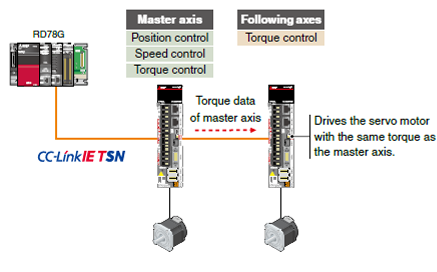
- *1.การสนับสนุนed by MELSERVO-J5 Series.
สภาพแวดล้อมวิศวกรรม
MELSOFT GX Works3 covers various aspects of development processes - parameter settings, servo adjustments, and debugging of โมดูลการเคลื่อนที่s as well as sequence program creation. This software offers an engineering environment that provides comfortable design environment.
MELSOFT GX Works3
Various features are integrated into GX Works3, which allows users not only to easily create projects but also maintain consistency through the entire development processes.

System Design

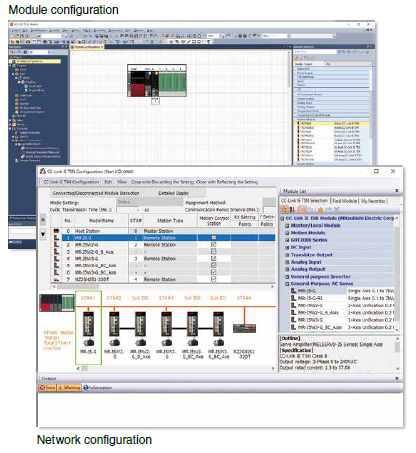
- Module configuration
- เครือข่าย configuration
- Data settings for servo amplifiers
- Settings for remote I/O
- Parameter conversion ฟังก์ชัน
Programming (Positioning)

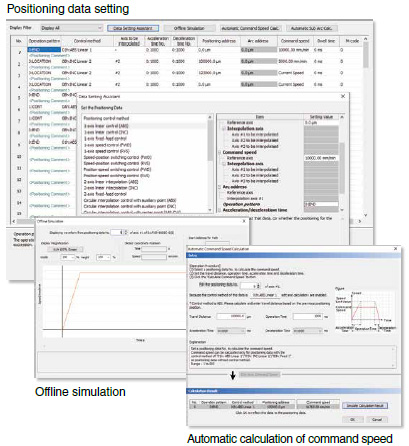
- Programming with Ladder, SFC, FBD/LD
- Positioning data settings
- Offline simulation, automatic calculation of command ความเร็ว
Programming (การควบคุมแบบซิงโครนัสขั้นสูง)
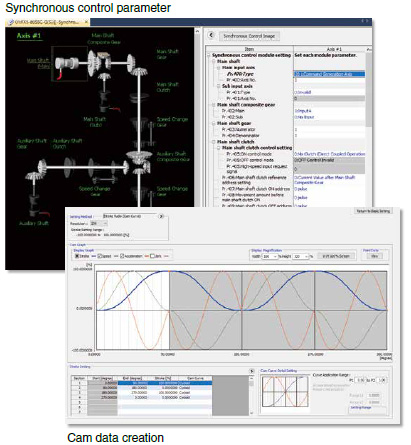
- การควบคุมแบบซิงโครนัส parameter
- Cam data creation, cam data list
Debug/Maintenance


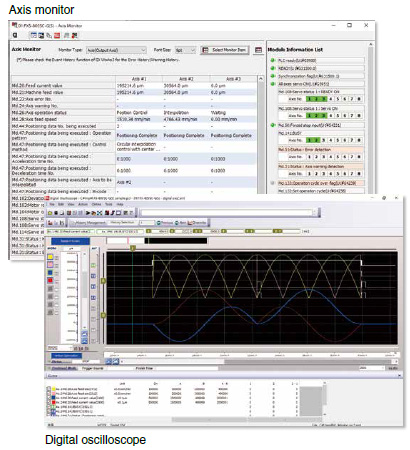
- Event history
- กระแสไฟฟ้า value history, start history, axis monitor
- Servo monitor
- Digital oscilloscope
รายการฟังก์ชัน
| Motion Module | ||||
|---|---|---|---|---|
| RD78G16 | RD78G8 | RD78G4 | ||
| Maximum number of การควบคุม axes | 16 | 8 | 4 | |
| Minimum operation cycle [μs] *1 | 250 | |||
| Servo amplifier connection method | CC-Link IE TSN (Communications ความเร็ว: 1 Gbps/100 Mbps) | |||
| Servo amplifier ที่เชื่อมต่อได้ | MR-J5-G, MR-J5W-G, MR-J5D-G4 More details
MR-JET-G More details |
|||
| Maximum distance between stations [m(ft.)] | 100 (328.08) | |||
| โหมดควบคุม | การควบคุมตำแหน่ง, ความเร็ว การควบคุม, Torque การควบคุม, การควบคุมแบบซิงโครนัส, Cam การควบคุม | |||
| การควบคุมตำแหน่ง | การควบคุมตำแหน่ง, การอินเตอร์โพเลชันเชิงเส้น (สูงสุด 4 axes), การอินเตอร์โพเลชันแบบวงกลม (2 axes), Helical interpolation |
|||
| Acceleration/deceleration process | Trapezoidal acceleration/deceleration, การเร่ง/ชะลอแบบ S-curve | |||
| การควบคุมตำแหน่ง method | Motion profile table | |||
| หน้าแรก position return | Driver home position return *2 | |||
| คู่มือควบคุม | JOG operation, คู่มือ pulse generator operation, Inching operation | |||
| Auxiliary ฟังก์ชัน | Forced stop, Hardware stroke limit, ซอฟต์แวร์ stroke limit, ระบบตำแหน่งสัมบูรณ์, ฟังก์ชันออสซิลโลส⤻ดิจิทัล, Acceleration/deceleration time change, Inter-Module Synchronization, Target position change, Torque limit value change, ความเร็ว change, Override, CC-Link IE TSN safety ฟังก์ชันการสื่อสาร *3 |
|||
| คอมมอน ฟังก์ชัน | Driver Communication, Mark detection, Virtual servo amplifier, Event history, Optional data monitor | |||
| Engineering environment | MELSOFT GX Works3 | |||
| Number of I/O occupying จุด | 32 | |||
| 5VDC internal กระแส consumption [A] | 1.93 | |||
| Mass [kg] | 0.26 | |||
- *1.The minimum operation cycle varies depending on the number of การควบคุม axes and the model.
- *2.The home position return method set in a driver (a servo amplifier) is used.
- *3.การสนับสนุนed by MELSERVO-J5 Series.